Showing posts with label MSSQL. Show all posts

Thursday, 19 January 2023

MSSQL: How to read an UTF-8 file (XML or JSON)?

It is not sosimple to read an UTF-8 file.

Solution:
1. Read file as binary (BLOB)
then
2. Cast content to XML (also for JSON and other formats!!!)
then
3. Cast to the NVARCHAR(MAX)

For example:
SELECT Content = CAST(CAST(Content AS XML) AS NVARCHAR(MAX)) -- !!! Double CAST because of UTF-8 source
FROM OPENROWSET(BULK N'... Path to my file ...', SINGLE_BLOB) AS T(Content)
Then you can save this Content directly to the Variable:
DECLARE @Content NVARCHAR(MAX) = (
    SELECT Content = CAST(CAST(Content AS XML) AS NVARCHAR(MAX)) -- !!! Double CAST because of UTF-8 source
    FROM OPENROWSET(BULK N'... Constant path to my file ...', SINGLE_BLOB) AS T(Content)
)
If path to yout file is a constant, the it works.
But if you want to put this path as parameter, then will be necessary to use dynamic SQL:
DECLARE @FilePath NVARCHAR(260) = N'... Parametrized path to my file ...';
DECLARE @ContentTable TABLE (Content VARCHAR(MAX));
INSERT @ContentTable
EXEC ('
	SELECT Content = CAST(CAST(Content AS XML) AS NVARCHAR(MAX)) -- !!! Double CAST because of UTF-8 source
	FROM OPENROWSET(BULK N''' + @FilePath + ''', SINGLE_BLOB) AS T(Content)
');
DECLARE @Content NVARCHAR(MAX) = (SELECT Content FROM @ContentTable);

Monday, 1 February 2021

Reduce SSMS startup time

To reduce the SQL Server Management Studio (SSMS) startup time do following:

1. Edit Shortcut tu start SSMS and append this startup parameter: -nosplash
2. Open system Internet options, go to the Advanced tab and uncheck "Check for server certificate revocation" - this change reuqires system restart.

After that both changes startup time (by me) is 10 times shorter

Additionaly you can reduce clicks by predefine other startup parameters.
For example for localhost, trusted connection and USE of MyDatabase:
..../SSMS.exe -S . -E -d MyDatabase -nosplash

I also set this option:
SSMS Menu / Tools / Option / Environmen / Startup / At statrup = "Open Object Explorer and query window"

Tuesday, 25 July 2017

MSSQL - How to clear all caches?

Script to clear all caches? (For example for performance debug)

/*
https://yabele.blogspot.com/2017/07/mssql-how-to-clear-all-caches.html
*/
SET NOCOUNT ON;
DECLARE @StartedAt DATETIME2 = GETDATE();
CHECKPOINT; 
DBCC DROPCLEANBUFFERS;
DBCC FREESYSTEMCACHE ('ALL');
-- Query
PRINT '    Elapsed time: ' + CAST(DATEDIFF(ms, @StartedAt, GETDATE()) AS VarChar(20)) + ' ms';

MSSQL - T-SQL equivalent of VBA VAL() function

There the text of scalar-value function to extract numbers from string and convert to integer:

IF OBJECT_ID(N'dbo.fn_extract_digits') IS NOT NULL
  DROP FUNCTION dbo.fn_extract_digits;
GO

CREATE FUNCTION dbo.fn_extract_digits (@str VARCHAR(MAX))
/*
https://yabele.blogspot.com/2017/07/mssql-t-sql-equivalent-of-vba-val.html
*/
RETURNS INT
AS
BEGIN
  DECLARE
    @newstr VARCHAR(MAX) = '',
    @i INT = 1,
    @chr CHAR(1);

  WHILE @i <= LEN(@str) BEGIN
    SET @chr = SUBSTRING(@str, @i, 1);
    IF @chr BETWEEN '0' AND '9'
      SET @newstr = @newstr + @chr;
    SET @i = @i + 1;
  END;

  RETURN CAST(@newstr AS INT);
END
/*
DECLARE @str VARCHAR(MAX) = '1-23-456';
SELECT Digits = dbo.fn_extract_digits(@str);*/
;

MSSQL - Function to generate empty rows

There the text of inline table-value function to generate a specified count of empty rows:

IF OBJECT_ID(N'dbo.GenerateRows') IS NOT NULL
  DROP FUNCTION dbo.GenerateRows;
GO
CREATE FUNCTION dbo.GenerateRows (@Count INT)
/*
https://yabele.blogspot.com/2017/07/mssql-function-to-generate-empty-rows.html
*/
RETURNS TABLE
AS
RETURN
WITH TenRows AS (
  SELECT * FROM (VALUES (1),(2),(3),(4),(5),(6),(7),(8),(9),(10)) AS T(I)
)
SELECT TOP(@Count)
  I = ROW_NUMBER() OVER(ORDER BY (SELECT 1))
FROM
  TenRows T1 CROSS JOIN TenRows T2 CROSS JOIN TenRows T3 CROSS JOIN TenRows T4 CROSS JOIN TenRows T5
/*
SELECT * FROM dbo.GenerateRows(100);
*/
;

Wednesday, 24 August 2016

MSSQL - How to generate range of Dates

There the text of VIEW to generate range of dates between 1.January 2000 and 31.December next year:

IF OBJECT_ID(N'dbo.calendar_dates') IS NOT NULL
  DROP VIEW  dbo.calendar_dates;
GO
/*
http://yabele.blogspot.de/2016/08/how-to-generate-range-of-dates.html
*/
CREATE VIEW dbo.calendar_dates
AS
WITH
  R10 AS (
    SELECT * FROM (VALUES (1),(2),(3),(4),(5),(6),(7),(8),(9),(10)) AS T(I)
  )
SELECT TOP(DATEDIFF(DAY, '2000-01-01', CAST(YEAR(GETDATE()) + 1 AS CHAR(4)) + '-12-31'))
  date_value = DATEADD(DAY, ROW_NUMBER() OVER(ORDER BY (SELECT 1)), '1999-12-31')
FROM
  R10 T1 CROSS JOIN R10 T2 CROSS JOIN R10 T3 CROSS JOIN R10 T4 CROSS JOIN R10 T5 CROSS JOIN R10 T6
/*
SELECT *
FROM dbo.calendar_dates
ORDER BY date_value;
*/
;

Monday, 17 August 2015

MSSQL - How to replicate to readonly database?

First, I have to apologize, title of article lies - it is unfortunately impossible to set up replication into the READ-ONLY database.
One of the reasons why we want to have the target database read-only, is the need to avoid direct changes of data in it.
For this purpose, we can use another method - Triggers, which prohibit any changes except changes from the replication.

There such trigger:
USE MySourceDB
GO
ALTER TRIGGER dbo.trig_mytable_CheckContext4Changes ON dbo.MyTable
    FOR INSERT, UPDATE, DELETE
    NOT FOR REPLICATION
AS
IF NOT (@@SERVERNAME = 'MySourceServer' AND DB_NAME = 'MySourceDB')
    ROLLBACK;

Very important is this expression: NOT FOR REPLICATION.
On the target database at the same time we have to
- prohibit all direct changes (INSERT/UPDATE/DELETE)
- but allow data changes which are comming from replication
Expression NOT FOR REPLICATION deactivates trigger for changes from replication.

Monday, 10 August 2015

MSSQL - Immediately PRINT big messages - more then 8000 bytes (4000 unicode characters)

Transact-SQL function PRINT has two disadvatages:
- is limited for 8000 bytes - 8000 VARCHAR characters or 4000 NVARCHAR (unicode) characters
- does not send messages immediately to the client, usually user have to wait until the procedure is complete before seeing messages

We can use alternate method - the RAISERROR function, this function can send messages immediately, but is limited for 2047 characters.

There the stored procedure which send any messages immediately to client, also with length more then 2047 (or 8000) characters:
CREATE PROCEDURE [dbo].[sp_print_big_message]
    @message NVARCHAR(MAX)
AS BEGIN

    -- SET NOCOUNT ON to prevent extra log messages
    SET NOCOUNT ON;

    DECLARE
        @CRLF            CHAR(2) = CHAR(13)+CHAR(10),
        @message_len    INT = LEN(@message),
        @i                INT,
        @part            NVARCHAR(2000),
        @part_len        INT;

    IF @message_len <= 2000 BEGIN
        -- Message ist enough short
        RAISERROR (@message, 0,1) WITH NOWAIT;
    END ELSE BEGIN
        -- Message is too long
        SET @i = 1;
        WHILE @i < LEN(@message) BEGIN
            -- Split to parts end send them to client immediately
            SET @part = SUBSTRING(@message, @i, 2000);
            SET @part_len = 2000 - CHARINDEX(CHAR(10) + CHAR(13), REVERSE(@part)) - 1;
            SET @part = CASE @i
                            WHEN 1
                            THEN ''
                            ELSE '/* CRLF ' + CAST(@i AS VARCHAR(20)) + ':'
                                 + CAST(@part_len AS VARCHAR(20)) + ' */' + @CRLF
                        END
                        + REPLACE(SUBSTRING(@message, @i, @part_len), '%', '%%');
            RAISERROR (@part, 0,1) WITH NOWAIT;
            SET @i = @i + @part_len + 2;
        END;
    END;

END;

Usage:
-- Declare long message
DECLARE @LongMessage NVARCHAR(MAX) = '';
-- Fill message with test data
DECLARE @i INT = 1;
WHILE @i < 200 BEGIN
    SET @LongMessage = @LongMessage
                       + CASE @i WHEN 1 THEN '' ELSE CHAR(13) + CHAR(10) END
                       + CAST(@i AS VARCHAR(10))
                       + '. Lorem ipsum dolor sit amet, consectetur adipiscing elit.';
    SET @i = @i + 1;
END;

-- Display length of generated message
DECLARE @len INT = LEN(@LongMessage);
RAISERROR('Message length: %i', 0, 1, @len);

-- Use SP to print long message
EXEC sp_print_big_message @LongMessage;

Monday, 3 August 2015

MSSQL - Convert speсial types to strings or HTML:
  • MONEY to string,
  • DATETIME to string,
  • GUID or UNIQUEIDENTIFIER to string,
  • VARBINARY or BINARY to string,
  • XML to string,
  • TIMESTAMP to string

Most of datatypes is relative simple convert to a string.
For this we can use the CONVERT() or even the CAST() function:
SELECT int_as_string = CONVERT(VARCHAR(20), int_field) FROM MyTable;

SELECT int_as_string = CAST(int_field AS VARCHAR(20))  FROM MyTable;

But for some other datatypes convert is not so simple.
For example for MONEY, DATETIME, UNIQUEIDENTIFIER, BINARY, XML and TIMESTAMP datatypes.

There the script which shows how to convert such datatypes to strings:
USE tempdb;
GO

-- Drop test table if exists
IF OBJECT_ID('test_converts') IS NOT NULL
    DROP TABLE test_converts;
GO

-- Create test table
-- The technique to generate random money value I have used from there:
--     http://yabele.blogspot.de/2013/08/mssql-random-number-generator-with.html
CREATE TABLE test_converts
(
    mon MONEY             NOT NULL DEFAULT RAND(CHECKSUM(NEWID())) * 1000,
    dt DATETIME           NOT NULL DEFAULT GETDATE(),
    guid UNIQUEIDENTIFIER NOT NULL DEFAULT NEWID(),
    bin VARBINARY(MAX)    NOT NULL DEFAULT NEWID(),
    x XML                 NOT NULL,
    ts TIMESTAMP
);
GO

-- Fill test table with 3 records
-- For all columns except "x" (xml) the default values will be used
INSERT INTO test_converts (x)
VALUES
    ('<a b="c"><d/></a>'),
    ('<e f="g"><h/></e>'),
    ('<i j="k"><l/></i>');

-- Show original values
SELECT * FROM test_converts;

-- Convert values to string
SELECT
                          -- Third parameter (0) is default and generates result text
                          -- in "0.00" format
    money_as_string     = CONVERT(VARCHAR(20), mon, 0),
                          -- Third parameter (121) generates result text
                          -- in ODBC-canonical format: "yyyy-MM-dd HH:mm:ss.sss"
    datetime_as_string  = CONVERT(VARCHAR(30), dt, 121),
    guid_as_string      = CONVERT(VARCHAR(36), guid),
                          -- Third parameter (1) generates result text
                          -- in uppercase form with "0x" prefix
    binary_as_string    = CONVERT(VARCHAR(MAX), bin, 1),
    xml_as_string       = CONVERT(VARCHAR(MAX), x),
    timestamp_as_string = CONVERT(VARCHAR(MAX), CONVERT(VARBINARY(MAX), ts), 1)
FROM
    test_converts;

After execution in SSMS (SQL Server Management Studio) we will have these two resultsets:


These techniques could be used for example to convert table-content to HTML.
In case you need convert values to HTML-string some converted string values will be necessary to HTML-encode:
-- Convert values to HTML-string
SELECT
                        -- Third parameter (0) is default and generates result text
                        -- in "0.00" format
    money_as_HTML     = CONVERT(VARCHAR(20), mon, 0),
                        -- Third parameter (121) generates result text
                        -- in ODBC-canonical format: "yyyy-MM-dd HH:mm:ss.sss"
    datetime_as_HTML  = CONVERT(VARCHAR(30), dt, 121),
    guid_as_HTML      = CONVERT(VARCHAR(36), guid),
                        -- Third parameter (1) generates result text
                        -- in uppercase form with "0x" prefix
    binary_as_HTML    = CONVERT(VARCHAR(MAX), bin, 1),
                        -- Convert XML-string to HTML-encoded string
    xml_as_HTML       = REPLACE(REPLACE(REPLACE(
                            CONVERT(VARCHAR(MAX), x)
                        , '&','&amp;'), '<', '&lt;'), '>', '&gt;'),
    timestamp_as_HTML = CONVERT(VARCHAR(MAX), CONVERT(VARBINARY(MAX), ts), 1)
FROM
    test_converts;

Correspondent resultset in SSMS:


See also:
MSSQL - The random number generator with a random initialization (random seed)

Friday, 24 July 2015

MSSQL - Kill all my processes (except current)

Template to kill all my processes (connections) except current

USE master
GO

DECLARE @sql VARCHAR(MAX) = '-- Kill all my processes (except current: '
                          + CAST(@@SPID AS VARCHAR(20)) + ')';
SELECT @sql = @sql + CHAR(13) + CHAR(10) + 'kill ' + CONVERT(varchar(5), spid) + ';'
FROM master..sysprocesses
WHERE hostname = HOST_NAME() AND spid != @@SPID;

PRINT @sql;
EXEC (@sql);

After execution we have something like this:

-- Kill all my processes (except current: 80)
kill 52;
kill 53;
kill 73;

Wednesday, 8 July 2015

MSSQL - Stored procedure to replace placeholders in texts (dynamic SQL)

It is often necessary to make the query text from constant pieces and variables.

For example we have a many tables with such structure:
(
    ID         INT IDENTITY(1,1) PRIMARY KEY,
    Number     INT,
    ChangeDate DATETIME
)
and we need dynamically, depending on variables with table name, [Number] min value and [ChangeDate] min value send queries to one or other table.
We can do it using Dynamic SQL method, for example so:

CREATE PROCEDURE MySP
    @ObjectName SYSNAME,
    @MinNumber  INT,
    @ValidFrom  DATETIME
AS BEGIN
    DECLARE @SQL NVarChar(MAX);

    SET @SQL = '
        SELECT
            *
        FROM
            ' + @ObjectName + '
        WHERE
            Number >= ' + CAST(@MinNumber AS VARCHAR(20)) + '
            AND
            ChangeDate >= CONVERT(DATETIME, '''
            + CONVERT(VARCHAR(30), @ValidFrom, 121) + ''', 121);';

    PRINT @SQL;

    EXEC sp_executesql @SQL;
END;
GO

EXEC MySP 'MyTableNr1', 123, '2015-01-01 12:00';

It works, but SQL-Text format is not readable.
Much more readable looks the text converted to a template with placeholders:

'
SELECT
    *
FROM
    {ObjectName}
WHERE
    Number >= {MinNumber}
    AND
    ChangeDate >= CONVERT(DATETIME, ''{ValidFrom}'';
'

In this case our example stored procedure will look like this:

CREATE PROCEDURE MySP
    @ObjectName SYSNAME,
    @MinNumber  INT,
    @ValidFrom  DATETIME
AS BEGIN
    DECLARE @SQL NVarChar(MAX);

    SET @SQL = '
        SELECT
            *
        FROM
            {ObjectName}
        WHERE
            Number >= {MinNumber}
            AND
            ChangeDate >= CONVERT(DATETIME, ''{ValidFrom}'';'

    SET @SQL = REPLACE(@SQL, '{ObjectName}', @ObjectName);
    SET @SQL = REPLACE(@SQL, '{MinNumber}',  CAST(@MinNumber AS VARCHAR(20)));
    SET @SQL = REPLACE(@SQL, '{ValidFrom}',  CONVERT(VARCHAR(30), @ValidFrom, 121));

    PRINT @SQL;

    EXEC sp_executesql @SQL;
END;

It is good for so simple example, but if we will have more dynamical parameters and inside one stored procedure (or plain query) more then one template, then this query will have too many redundant call like this:
SET @SQL = REPLACE(@SQL, ..., ...);

The solution is to create some help procedure which will take text template and dictionary with placeholder name:value pairs as parameters.
Stored procedure can not take table-value parameters directly.
Table-valued parameters have to be declared by using user-defined table types.
In our case:
CREATE TYPE PlaceholderMappingType AS TABLE (
    Placeholder NVARCHAR(100),
    Value NVARCHAR(MAX)
);

The complete script with usage example:
USE tools;
GO
IF OBJECT_ID('tools.dbo.sp_ReplacePlaceholders') IS NOT NULL BEGIN
    PRINT '-- DROP PROCEDURE dbo.sp_ReplacePlaceholders';
    DROP PROCEDURE dbo.sp_ReplacePlaceholders;
END;
GO
IF EXISTS (
    SELECT *
    FROM tools.INFORMATION_SCHEMA.DOMAINS
    WHERE DOMAIN_NAME = 'PlaceholderMappingType'
) BEGIN
    PRINT '-- DROP TYPE dbo.PlaceholderMappingType';
    DROP TYPE dbo.PlaceholderMappingType;
END;
GO
PRINT '-- CREATE TYPE dbo.PlaceholderMappingType';
-- TABLE-Domain (User Defined Type) for placeholders dictionary
CREATE TYPE PlaceholderMappingType AS TABLE (
    Placeholder NVARCHAR(100),
    Value NVARCHAR(MAX)
);
GO
CREATE PROCEDURE dbo.sp_ReplacePlaceholders (
    @Text                NVARCHAR(MAX) OUTPUT,
    -- TABLE-Domain (User Defined Type) for placeholders dictionary
    @PlaceholderMappings PlaceholderMappingType READONLY,
    -- Flag to replace in placeholder values each single apostrof with double apostrof
    @EscapeApostrofs     BIT = 1,
    -- Text to TrimLeft in each text line
    @IndentString        VARCHAR(MAX) = '',
    -- Flag to PRINT additional diagnostic information
    @Debug               BIT = 0
)
AS BEGIN
    SET NOCOUNT ON;

    IF (@Debug = 1)
        PRINT '-- EXEC dbo.sp_ReplacePlaceholders'

    DECLARE
        @CRLF             CHAR(2) = CHAR(13)+CHAR(10),
        @Indent_CharIndex INT,
        @I                INT = 0,
        @Char             CHAR(1),
        @Indent           VARCHAR(MAX) = '';

    -- Trim rows left
    IF (CHARINDEX(@IndentString, @Text, 0) = 1)
        SET @Text = STUFF(@Text, 1, LEN(@IndentString), '');
    SET @Text = REPLACE(@Text, @CRLF + @IndentString, @CRLF);

    -- Declare FOREACH(placeholderRow IN @PlaceholderMappings) cursor
    DECLARE
        @Placeholder NVARCHAR(102),
        @Value       NVARCHAR(MAX);
    DECLARE Placeholders_Cursor CURSOR
    LOCAL STATIC READ_ONLY FORWARD_ONLY
    FOR
    SELECT
        Placeholder = '{' + REPLACE(REPLACE(Placeholder, '{', ''), '}', '') + '}',
        Value       = CASE @EscapeApostrofs
                          WHEN 1
                          THEN REPLACE(Value, '''', '''''')
                          ELSE Value
                      END
    FROM @PlaceholderMappings;

    OPEN Placeholders_Cursor;

    FETCH NEXT FROM Placeholders_Cursor INTO @Placeholder, @Value;
    WHILE @@FETCH_STATUS = 0 BEGIN
        
        IF (@Debug = 1) AND (CHARINDEX(@Placeholder, @Text) = 0)
            PRINT '--        ==> Could not find Placeholder ' + @Placeholder;
        SET @Text = REPLACE(@Text, @Placeholder, @Value);

        FETCH NEXT FROM Placeholders_Cursor INTO @Placeholder, @Value;
    END;

    CLOSE Placeholders_Cursor
    DEALLOCATE Placeholders_Cursor

    RETURN;
END;
GO
DECLARE
    @SQL NVARCHAR(MAX),
    @PlaceholderMappings PlaceholderMappingType;

SET @SQL = '
        SELECT
            F1=''{aaa}'',
            F2=''{bbb}'',
            F3=''{ddd}'';';
INSERT INTO @PlaceholderMappings
VALUES
    ('aaa',   'A''A''A'),
    ('{bbb}', 'BBB'),
    ('ccc',   'CCC');

DECLARE @IndentString VARCHAR(MAX) = SPACE(8);
EXEC dbo.sp_ReplacePlaceholders
    @SQL OUTPUT,
    @PlaceholderMappings,
    @IndentString=@IndentString,
    @Debug=1;
PRINT '>>>' + @SQL + '<<<';

Tuesday, 7 July 2015

To get all list of all script objects (VIEWs, SPs, UDFs) which are depending on some other script object we can use help of sys.sql_expression_dependencies system view:

SELECT
 object_name = OBJECT_NAME(D.referencing_id),
 O.type,
 O.type_desc
FROM
 sys.sql_expression_dependencies D
 INNER JOIN sys.objects O ON D.referencing_id = O.object_id
WHERE
 referenced_entity_name LIKE 'MyStoredProcedure';

Query result looks like this:


Now we can extend this query with navigation through all databases and save it as T-SQL Query Template:

DECLARE
    @referenced_entity SYSNAME = '<referenced_entity, sysname, ???>',
    @referencing_entity SYSNAME = '<referencing_entity, sysname, %>',
    @sql NVARCHAR(MAX) = '
SELECT
    server_name=NULL,
    database_name=NULL,
    object_name=NULL,
    object_type=NULL,
    object_type_desc=NULL
WHERE 1=0';

SELECT @sql = @sql + REPLACE(REPLACE(REPLACE(REPLACE('
UNION ALL
SELECT
    server_name = @@SERVERNAME,
    database_name = ''{database_name}'',
    object_name = OBJECT_NAME(D.referencing_id, {database_id}),
    object_type = O.type,
    object_type_desc = O.type_desc
FROM
    {database_name}.sys.sql_expression_dependencies D
    INNER JOIN {database_name}.sys.objects O ON D.referencing_id = O.object_id
WHERE
    D.referenced_entity_name LIKE ''{referenced_entity}''
    AND
    OBJECT_NAME(D.referencing_id, {database_id}) LIKE ''{referencing_entity}''',
    '{database_id}', database_id),
    '{database_name}', name),
    '{referenced_entity}', @referenced_entity),
    '{referencing_entity}', @referencing_entity)
FROM sys.databases
WHERE state=0 /* ONLINE */
ORDER BY name;

SET @sql = @sql + '
';

EXEC(@sql);


See also MSSQL - Query Templates

MSSQL - Very fast method to get statistic (rows and bytes) for all database tables

Typical way to count all rows in the table ist to send such query:

SELECT COUNT(*) FROM MyTable;

This method has some disadvantages:
  1. We can only get a rows count, but not a physical size of table
  2. This query works on one table, name of which we have to define explicitly
  3. If table has no PRIMARY KEY, then this query can be very slow

There is some other method - to use a statistic from system tables.
This method uses for example this predefined SSMS report:


We can start Profiler (Menu =&rt; Tools =&rt; SQL Server Profiler) and extract for own usage a background query of this report.
I have already extracted this query and reformated as standalone VIEW:

CREATE VIEW dbo.disk_usage_by_table
AS
SELECT TOP(100) PERCENT
    Database_Name = DB_NAME(),
    Schema_Name   = CAST(a3.name AS SYSNAME),
    Table_Name    = CAST(a2.name AS SYSNAME),
    Records       = a1.records,
    Reserved_KB   = (a1.reserved + ISNULL(a4.reserved,0))* 8, 
    Data_KB       = a1.data * 8,
    Indexes_KB    = CASE
                        WHEN (a1.used + ISNULL(a4.used,0)) > a1.data
                        THEN (a1.used + ISNULL(a4.used,0)) - a1.data
                        ELSE 0
                    END * 8,
    Unused_KB     = CASE
                        WHEN (a1.reserved + ISNULL(a4.reserved,0)) > a1.used
                        THEN (a1.reserved + ISNULL(a4.reserved,0)) - a1.used
                        ELSE 0
                    END * 8
FROM
    (
        SELECT 
            ps.object_id,
            records = SUM(
                        CASE
                            WHEN (ps.index_id < 2)
                            THEN row_count
                            ELSE 0
                        END
                    ),
            reserved = SUM(ps.reserved_page_count),
            data = SUM(
                        CASE
                            WHEN ps.index_id < 2
                            THEN ps.in_row_data_page_count
                               + ps.lob_used_page_count
                               + ps.row_overflow_used_page_count
                            ELSE ps.lob_used_page_count
                               + ps.row_overflow_used_page_count
                        END
                    ),
            used = SUM(ps.used_page_count)
        FROM sys.dm_db_partition_stats ps
        GROUP BY ps.object_id
    ) AS a1
    INNER JOIN sys.all_objects a2  ON ( a1.object_id = a2.object_id ) 
    INNER JOIN sys.schemas a3 ON (a2.schema_id = a3.schema_id)
    LEFT OUTER JOIN (
        SELECT 
            it.parent_id,
            SUM(ps.reserved_page_count) AS reserved,
            SUM(ps.used_page_count) AS used
        FROM sys.dm_db_partition_stats ps
        INNER JOIN sys.internal_tables it ON (it.object_id = ps.object_id)
        WHERE it.internal_type IN (202,204)
        GROUP BY it.parent_id
    ) AS a4 ON (a4.parent_id = a1.object_id)
WHERE a2.type <> N'S' and a2.type <> N'IT'
ORDER BY Table_Name;

If we query this VIEW:

SELECT * FROM dbo.disk_usage_by_table;

then we can see that [count rows], [reserved space], [space used for data], [space used for indexes] and [free space] for 106 tables takes less then 1 second:


We can also filter or join this view with other tables/views:

SELECT Records FROM dbo.disk_usage_by_table WHERE Table_Name = 'dim_date';


This method has folowing advantages:
  1. Is very very fast
  2. Is independent of table names
  3. Shows
    • Count of records
    • Reserved space (in KBytes)
    • Space used by data (in KBytes)
    • Space used by indexes (in KBytes)
    • Unused space (in KBytes)

You can use this metod for example in ETL processes to count (outside of transformation) rows and space before and after load.

Monday, 6 July 2015

MSSQL - CHANGE TRACKING - How can I get DateTime of changes?

Change tracking is a lightweight solution that provides an efficient change tracking mechanism for applications.
You can get more information on the Microsoft Developer Network web site.

But on these pages you will not find an answer on this question:
How can I get DateTime of changes. You can find this information in the sys.dm_tran_commit_table DMV (Dinamic Management View).

There the complete T-SQL script:

-- Recreate test table
IF OBJECT_ID('dbo.TestCT') IS NOT NULL
    DROP TABLE dbo.TestCT;
GO
CREATE TABLE dbo.TestCT
(
    ID INT IDENTITY(1,1) NOT NULL,
        CONSTRAINT [dbo.TestCT.PK] PRIMARY KEY CLUSTERED (ID),
    Code VARCHAR(10) NOT NULL,
    Description NVARCHAR(100) NULL
);

GO
-- Enable CHANGE TRACKING for test table
ALTER TABLE dbo.TestCT ENABLE CHANGE_TRACKING 

GO
-- Fill test table with initial rows
INSERT INTO dbo.TestCT(Code, Description)
VALUES
    ('AAA', 'Lorem ipsum dolor sit amet, consectetur adipiscing elit.'),
    ('BBB', 'Cras sed tincidunt dolor, in interdum lorem.'),
    ('CCC', 'Vestibulum eget condimentum orci.');

GO
-- Wait for 30 seconds
WAITFOR DELAY '00:00:30'

GO
-- Change second row in the test table
UPDATE dbo.TestCT
SET Description = '!!! This line was changed !!!'
WHERE Code = 'BBB';

GO
-- Show CHANGE TRACKING information
-- directly after initial filling (VersionNumber=0)
SELECT
    CT.ID,
    CT.SYS_CHANGE_VERSION,
    CT.SYS_CHANGE_CREATION_VERSION,
    CT.SYS_CHANGE_OPERATION,
    COMM.commit_time
FROM
    CHANGETABLE(CHANGES dbo.TestCT, 0) CT
    INNER JOIN sys.dm_tran_commit_table COMM ON
        CT.sys_change_version = COMM.commit_ts
ORDER BY
    CT.ID, COMM.commit_time DESC;

-- Get initialisation version number
DECLARE @MaxCreationVersion INT = (
    SELECT TOP(1) SYS_CHANGE_CREATION_VERSION
    FROM CHANGETABLE(CHANGES dbo.TestCT, 0) CT
);

-- Show changes directly after initialisation
SELECT
    CT.ID, CT.SYS_CHANGE_VERSION, SYS_CHANGE_OPERATION,
    COMM.commit_time
FROM
    CHANGETABLE(CHANGES dbo.TestCT, @MaxCreationVersion) CT
    INNER JOIN sys.dm_tran_commit_table COMM ON
        CT.sys_change_version = COMM.commit_ts
ORDER BY
    CT.ID, COMM.commit_time DESC;

Execution result:

MSSQL - Performance tuning of Scalar-Value User Defined Functions (UDFs)

In most of cases the scalar-value User Defined Functions (Scalar UDF) are very slow.
It is enough to move the scalar expression in to UDF and query performance will be several times reduced.
Let us check ...

For testing, we need a test table with the dates from about a thousand years:
-- Recreate test table
IF OBJECT_ID('dbo.TestUDFs') IS NOT NULL
    DROP TABLE dbo.TestUDFs;
GO
CREATE TABLE dbo.TestUDFs(
    Datum Date
);
GO
-- SET NOCOUNT ON to prevent extra log messages returned as part of the result set:
-- (See: https://msdn.microsoft.com/en-us/library/ms189837%28v=sql.110%29.aspx)
SET NOCOUNT ON;
-- Fill test-table
DECLARE
    @Date Date = GetDate(),
       @i INT  = 0;
WHILE @i < 1000 * 365 BEGIN
    SET @Date = DATEADD(day, 1, @Date);
    INSERT INTO dbo.TestUDFs VALUES (@Date);
    SET @i = @i + 1;
END;
-- restore NOCOUNT
SET NOCOUNT OFF;
GO
SELECT CNT = COUNT(*) FROM dbo.TestUDFs;
GO


We will create four different UDFs:

FIRST:
Scalar-value UDF, which uses variables for intermediate calculations.
The body of function is placed into BEGIN-END container.
-- Recreate scalar-value UDF with variables in body
IF OBJECT_ID('dbo.fn_scalar_with_vars') IS NOT NULL
    DROP FUNCTION dbo.fn_scalar_with_vars;
GO
CREATE FUNCTION dbo.fn_scalar_with_vars (@date DATETIME)
RETURNS INT
AS BEGIN
    DECLARE @DateKey INT;
    SELECT @DateKey = CONVERT(INT, CONVERT(VARCHAR(8), @date, 112));
    RETURN @DateKey;
END;
GO
SELECT dbo.fn_scalar_with_vars(GetDate());
GO

SECOND:
Scalar-value UDF, which does not use intermediate calculations, and almost immediately returns the result of the calculation.
The body of function is placed into BEGIN-END container.
-- Recreate scalar-value UDF with direct expression (without variables) in body
IF OBJECT_ID('dbo.fn_scalar_direct_expression') IS NOT NULL
    DROP FUNCTION dbo.fn_scalar_direct_expression;
GO
CREATE FUNCTION dbo.fn_scalar_direct_expression (@date DATETIME)
RETURNS INT
AS BEGIN
    RETURN CONVERT(INT, CONVERT(VARCHAR(8), @date, 112));
END;
GO
SELECT DateKey = dbo.fn_scalar_direct_expression(GetDate());
GO
Scalar-value UDF which returns not scalar value, but a table-result.
For data storage uses UDF a table variable.
The body of function is placed into BEGIN-END container.
-- Recreate table-value UDF which returns table-variable
IF OBJECT_ID('dbo.fn_non_inline_table') IS NOT NULL
    DROP FUNCTION dbo.fn_non_inline_table;
GO
CREATE FUNCTION dbo.fn_non_inline_table (@date DATETIME)
RETURNS @DateKey TABLE(DateKey INT)
AS BEGIN
    INSERT INTO @DateKey
    VALUES (CONVERT(INT, CONVERT(VARCHAR(8), @date, 112)));
RETURN;
END
GO
SELECT DateKey FROM dbo.fn_non_inline_table(GetDate());
GO
Finally the UDF, which returns a non-scalar value, but a table.
There is no any BEGIN-END container, and the expression is placed immediately after the AS expression.
Such UDFs are called "Inline Table-Value UDF".
-- Recreate inlide table-value UDF
IF OBJECT_ID('dbo.fn_inline_table') IS NOT NULL
    DROP FUNCTION dbo.fn_inline_table;
GO
CREATE FUNCTION dbo.fn_inline_table (@date DATETIME)
RETURNS TABLE
AS
    RETURN SELECT DateKey = CONVERT(INT, CONVERT(VARCHAR(8), @date, 112));
GO
SELECT DateKey FROM dbo.fn_inline_table(GetDate());
GO


Let us test the direct evaluation of the expression in the query, and calls of all four UDFs.
Tests were performed on a virtual machine running on my NoteBook-e.
On other computers the results may differ.

The test script is defined so:
- in the first step we will store the current date and time in the variable
- for each row of the test table we will performed a calculation
- the test request substitute this text: / * Put calculation there * /.
We will count the number of milliseconds between start and time.

-- Script to test calculations
DECLARE
    @DateKey INT,
    @StartedAt DATETIME2 = GETDATE(); 

/* Put calculation there */

PRINT 'Elapsed time (Direct calculation): '
    + CAST(DATEDIFF(ms, @StartedAt, GETDATE()) AS VarChar(20)) + ' ms';

Calculation directly in query:
300 ms.
SELECT @DateKey = CONVERT(INT, CONVERT(VARCHAR(8), Datum, 112))
FROM dbo.TestUDFs;

Scalar-value UDF with variables and body:
1570 ms.
SELECT @DateKey = dbo.fn_scalar_with_vars(Datum)
FROM dbo.TestUDFs;

Scalar-value UDF with direct expression and body:
1274 ms.
SELECT @DateKey = dbo.fn_scalar_direct_expression(Datum)
FROM dbo.TestUDFs;

Non-inline table-value UDF with table-variable and body:
29623 ms.
SELECT @DateKey = DateKey
FROM dbo.TestUDFs CROSS APPLY dbo.fn_non_inline_table(Datum);

And now surprise - Inline table-value UDF:
210 ms!!! - at least the same result as in the first case, where a computation request occurs immediately.
SELECT @DateKey = DateKey
FROM dbo.TestUDFs CROSS APPLY dbo.fn_inline_table(Datum);


All-in-one Script (an execution takes about one minute):
-- SET NOCOUNT ON to prevent extra log messages:
-- See: https://msdn.microsoft.com/en-us/library/ms189837%28v=sql.110%29.aspx
SET NOCOUNT ON;
GO
IF OBJECT_ID('dbo.TestUDFs') IS NOT NULL
    DROP TABLE dbo.TestUDFs;
CREATE TABLE dbo.TestUDFs(
    [Date] Date
);
-- Fill test-table
DECLARE
    @Date Date = GetDate(),
       @i INT  = 0;
WHILE @i < 1000 * 365 BEGIN
    SET @Date = DATEADD(day, 1, @Date);
    INSERT INTO dbo.TestUDFs VALUES (@Date);
    SET @i = @i + 1;
END;
-- Check if table is filled
DECLARE @CNT INT = (SELECT COUNT(*) FROM dbo.TestUDFs);
PRINT 'Rows in TestUDFs table: ' + CAST(@CNT AS VARCHAR(20));
GO
IF OBJECT_ID('dbo.fn_scalar_with_vars') IS NOT NULL
    DROP FUNCTION dbo.fn_scalar_with_vars;
GO
CREATE FUNCTION dbo.fn_scalar_with_vars (@Date DATETIME)
RETURNS INT
AS BEGIN
    DECLARE @DateKey INT;
    SELECT @DateKey = CONVERT(INT, CONVERT(VARCHAR(8), @Date, 112));
    RETURN @DateKey;
END;
GO
IF OBJECT_ID('dbo.fn_scalar_direct_expression') IS NOT NULL
    DROP FUNCTION dbo.fn_scalar_direct_expression;
GO
CREATE FUNCTION dbo.fn_scalar_direct_expression (@Date DATETIME)
RETURNS INT
AS BEGIN
    RETURN CONVERT(INT, CONVERT(VARCHAR(8), @Date, 112));
END;
GO
IF OBJECT_ID('dbo.fn_non_inline_table') IS NOT NULL
    DROP FUNCTION dbo.fn_non_inline_table;
GO
CREATE FUNCTION dbo.fn_non_inline_table (@Date DATETIME)
RETURNS @DateKey TABLE(DateKey INT)
AS BEGIN
    INSERT INTO @DateKey
    VALUES (CONVERT(INT, CONVERT(VARCHAR(8), @Date, 112)));
RETURN;
END
GO
IF OBJECT_ID('dbo.fn_inline_table') IS NOT NULL
    DROP FUNCTION dbo.fn_inline_table;
GO
-- Recreate scalar-value UDF with direct expression (without variables) in body
IF OBJECT_ID('dbo.fn_scalar_direct_expression') IS NOT NULL
    DROP FUNCTION dbo.fn_scalar_direct_expression;
GO
CREATE FUNCTION dbo.fn_scalar_direct_expression (@Date DATETIME)
RETURNS INT
AS BEGIN
    RETURN CONVERT(INT, CONVERT(VARCHAR(8), @Date, 112));
END;
GO
-- Recreate table-value UDF which returns table-variable
IF OBJECT_ID('dbo.fn_non_inline_table') IS NOT NULL
    DROP FUNCTION dbo.fn_non_inline_table;
GO
CREATE FUNCTION dbo.fn_non_inline_table (@Date DATETIME)
RETURNS @DateKey TABLE(DateKey INT)
AS BEGIN
    INSERT INTO @DateKey
    VALUES (CONVERT(INT, CONVERT(VARCHAR(8), @Date, 112)));
RETURN;
END
GO
-- Recreate inlide table-value UDF
IF OBJECT_ID('dbo.fn_inline_table') IS NOT NULL
    DROP FUNCTION dbo.fn_inline_table;
GO
CREATE FUNCTION dbo.fn_inline_table (@Date DATETIME)
RETURNS TABLE
AS
    RETURN SELECT DateKey = CONVERT(INT, CONVERT(VARCHAR(8), @Date, 112));
GO
/********** Test all methods **********/
DECLARE
    @DateKey INT,
    @StartedAt DATETIME2 = GETDATE();

PRINT '
Calculation directly in query:'
SET @StartedAt = GETDATE();
SELECT @DateKey = CONVERT(INT, CONVERT(VARCHAR(8), [Date], 112))
FROM dbo.TestUDFs;
PRINT '    Elapsed time: '
    + CAST(DATEDIFF(ms, @StartedAt, GETDATE()) AS VarChar(20)) + ' ms';

PRINT '
Scalar-value UDF with variables and body:'
SET @StartedAt = GETDATE();
SELECT @DateKey = dbo.fn_scalar_with_vars([Date])
FROM dbo.TestUDFs;
PRINT '    Elapsed time: '
    + CAST(DATEDIFF(ms, @StartedAt, GETDATE()) AS VarChar(20)) + ' ms';

PRINT '
Scalar-value UDF with direct expression and body:'
SET @StartedAt = GETDATE();
SELECT @DateKey = dbo.fn_scalar_direct_expression([Date])
FROM dbo.TestUDFs;
PRINT '    Elapsed time: '
    + CAST(DATEDIFF(ms, @StartedAt, GETDATE()) AS VarChar(20)) + ' ms';

PRINT '
Non-inline table-value UDF with table-variable and body:'
SET @StartedAt = GETDATE();
SELECT @DateKey = DateKey
FROM dbo.TestUDFs CROSS APPLY dbo.fn_non_inline_table([Date]);
PRINT '    Elapsed time: '
    + CAST(DATEDIFF(ms, @StartedAt, GETDATE()) AS VarChar(20)) + ' ms';

PRINT '
Inline table-value UDF:'
SET @StartedAt = GETDATE();
SELECT @DateKey = DateKey
FROM dbo.TestUDFs CROSS APPLY dbo.fn_inline_table([Date]);
PRINT '    Elapsed time: '
    + CAST(DATEDIFF(ms, @StartedAt, GETDATE()) AS VarChar(20)) + ' ms';

GO
-- Restore SET NOCOUNT OFF
SET NOCOUNT OFF;

An execution of this Script generates this result message:

Rows in TestUDFs table: 365000

Calculation directly in query:
    Elapsed time: 300 ms

Scalar-value UDF with variables and body:
    Elapsed time: 1570 ms

Scalar-value UDF with direct expression and body:
    Elapsed time: 1274 ms

Non-inline table-value UDF with table-variable and body:
    Elapsed time: 29623 ms

Inline table-value UDF:
    Elapsed time: 210 ms

Wednesday, 11 December 2013

MSSQL - Simple GROUP_CONCAT

The simple and compact form of GROUP_CONCAT functionality in SQL Server.

Re-Creates table with test strings:
-- Re-Create and fill table with test strings
IF OBJECT_ID('dbo.TestTexts') IS NOT NULL
    DROP TABLE dbo.TestTexts;
GO
CREATE TABLE dbo.TestTexts (SomeText VARCHAR(20));
GO
INSERT INTO dbo.TestTexts
VALUES
    ('Aaa'),
    ('Bbb'),
    ('Ccc'),
    ('Ddd');
GO

Simple concatination of strings:
SELECT GROUP_CONCAT = '' + (
    SELECT '' + SomeText
    FROM dbo.TestTexts
    ORDER BY SomeText
    FOR XML PATH('')
)
Query Result:

GROUP_CONCAT
------------
AaaBbbCccDdd


Concatinates Strings with delimiter:
SELECT
    -- Remove First Comma
    GROUP_CONCAT = STUFF(
        (
            -- Concatinate Strings
            SELECT ',' + SomeText
            FROM dbo.TestTexts
            ORDER BY SomeText
            FOR XML PATH('')
        ),
        1,1,''
    );
GO    
Query Result:

GROUP_CONCAT
---------------
Aaa,Bbb,Ccc,Ddd

Tuesday, 13 August 2013

MSSQL - The random number generator with a random initialization (random seed)

The random number generator function RAND() produces every time the same sequence of random numbers from 0.0000 to 1.0000.

You can initiate it with some number (seed value) and then RAND(SeedValue) will return a different sequence.
But for the same initialization value RAND() will generate the same sequence of random numbers.
To get a different sequence every time we need each time a different initialization value.
To do this, we can use a combination of NEWID() and CHECKSUM():
SELECT RND=RAND(CHECKSUM(NEWID()));

For example:
SELECT RND=RAND(CHECKSUM(NEWID())) FROM MyBigTable;

MSSQL - How to get rows in random sort order

Sometimes it is necessary to get the query result sorted in random order.

The first idea is to use a random number generator:
SELECT * FROM MyTable ORDER BY RAND();

But if we run this query several times, we can see that the rows are returned each time in the same order.
There is another function that returns something random - NEWID().
This function creates a unique value of type uniqueidentifier (GUID).
SELECT * FROM MyTable ORDER BY NEWID();

If you need to return a set of 100 random rows (Table Sample), you can do following:
SELECT TOP(100) * FROM MyTable ORDER BY NEWID();

Tuesday, 2 July 2013

MSSQL - Query Templates - GROUP_CONCAT

Today I will show how to implement aggregation of strings in MSSQL  (similar to MySQL GROUP_CONCAT). My favorite way is with usage of FOR XML expression.

Imagine that we have, such a database:


We need to build a list of table fields so, that if a field with the same name is in multiple tables, then the second column in result set will contain alphabetically sorted and comma separated set of table names. For example, in our case, for all fields terminating by '_ID':


To solve this task, we will use the data from INFORMATION_SCHEMA tables.
In the first step, we will get a list of COLUMN-TABLE combinations:
SELECT DISTINCT
    COLUMN_NAME,
    TABLE_NAME
FROM
    INFORMATION_SCHEMA.COLUMNS
ORDER BY
    COLUMN_NAME, TABLE_NAME

now the same, but as XML:
SELECT DISTINCT
    COLUMN_NAME,
    TABLE_NAME
FROM
    INFORMATION_SCHEMA.COLUMNS
ORDER BY
    COLUMN_NAME, TABLE_NAME
FOR XML RAW

Now for each field name we need get own list of tables. Result should be also in XML form.
For this we need first a list of unique field names:
SELECT DISTINCT
    COLUMN_NAME
FROM
    INFORMATION_SCHEMA.COLUMNS
ORDER BY
    COLUMN_NAME

now combine this query with a query that returns list of COLUMN-TABLE combinations:
SELECT DISTINCT
    [COLUMN] = C1.COLUMN_NAME,
    [TABLEs] = (
            SELECT C2.TABLE_NAME
            FROM INFORMATION_SCHEMA.COLUMNS C2
            WHERE
                C2.COLUMN_NAME = C1.COLUMN_NAME
            ORDER BY TABLE_NAME
            FOR XML RAW
        )
FROM INFORMATION_SCHEMA.COLUMNS C1
ORDER BY [COLUMN]

We obtain the following table:


It now remains:
- Filter out the unnecessary tables (sysdiagrams)
- Leaving only the fields that terminating by '_ID'
- Replace the start and end XML tags with delimiter (comma)
SELECT DISTINCT
    [COLUMN] = C1.COLUMN_NAME,
    [TABLEs] = REPLACE(REPLACE(REPLACE(
        (
            SELECT T=C2.TABLE_SCHEMA + '.' + C2.TABLE_NAME
            FROM INFORMATION_SCHEMA.COLUMNS C2
            WHERE
                C2.TABLE_NAME != 'sysdiagrams'
                AND
                C2.COLUMN_NAME = C1.COLUMN_NAME
            ORDER BY 1
            FOR XML RAW
        ),
        '"/><row T="', ', '),
        '<row T="', ''),
        '"/>', '')
FROM INFORMATION_SCHEMA.COLUMNS C1
WHERE
    C1.TABLE_NAME != 'sysdiagrams'
    AND
    C1.COLUMN_NAME LIKE '%_ID'
ORDER BY [COLUMN]

The result of the query:


It remains to convert all of this in the form of T-SQL template:
USE <DataBaseName, sysname, tempdb>;
SELECT DISTINCT
    [COLUMN] = C1.COLUMN_NAME,
    [TABLEs] = REPLACE(REPLACE(REPLACE(
        (
            SELECT T=CASE C2.TABLE_SCHEMA
      WHEN SCHEMA_NAME()
      THEN ''
      ELSE C2.TABLE_SCHEMA + '.'
     END + C2.TABLE_NAME
            FROM INFORMATION_SCHEMA.COLUMNS C2
            WHERE
                C2.TABLE_NAME != 'sysdiagrams'
                AND
                C2.COLUMN_NAME = C1.COLUMN_NAME
            ORDER BY T
            FOR XML RAW
        ),
        '"/><row T="', ', '),
        '<row T="', ''),
        '"/>', '')
FROM INFORMATION_SCHEMA.COLUMNS C1
WHERE
    C1.TABLE_NAME != 'sysdiagrams'
    AND
    C1.COLUMN_NAME LIKE <ColumnNamePattern, sysname, '%'>
ORDER BY [COLUMN]

Save it in the list of SQL-templates.
Now we can use this template to find the fields of the same name in different tables:


About templates and usage of the system tables you can read here:
MSSQL - Query Templates
MSSQL - Query Templates - usage of system tables

Thursday, 13 June 2013

MSSQL - Query Templates - usage of system tables

Sometimes you have to find all the tables (their names), which have the field with the specified name.
The easiest way to do this is through queries to the system tables.
Because this task occurs frequently, I have created T-SQL template:
-- Find Tables by Column-Name
USE <DataBaseName, sysname, tempdb>;

SELECT
    [SCHEMA] = schemas.name,
    [TABLE]  = tables.name,
    [COLUMN] = columns.name
FROM
    sys.schemas
    INNER JOIN sys.tables ON
        schemas.schema_id = tables.schema_id
    INNER JOIN sys.columns ON
        tables.object_id  = columns.object_id
WHERE
    schemas.name IN ('<schema_name, sysname, dbo>')
    AND
    tables.name  LIKE '<TableNamePattern, sysname, %>'
    AND
    columns.name LIKE '<ColumnNamePattern, sysname, %_ID>'
ORDER BY
    [SCHEMA],
    [TABLE],
    [COLUMN];
Save this template to your templates folder with for example following name:
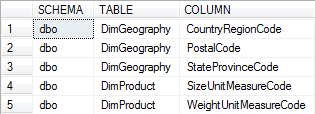
"SysTables - Sch-Tb-Clm". After replacing of placeholders you will see something like this:
-- Find Dimension-Tables with Code-Columns
USE AdventureWorksDW2008R2;

SELECT
    [SCHEMA] = schemas.name,
    [TABLE]  = tables.name,
    [COLUMN] = columns.name
FROM
    sys.schemas
    INNER JOIN sys.tables ON
        schemas.schema_id = tables.schema_id
    INNER JOIN sys.columns ON
        tables.object_id  = columns.object_id
WHERE
    schemas.name IN ('dbo')
    AND
    tables.name  LIKE 'Dim%'
    AND
    columns.name LIKE '%Code'
ORDER BY
    [SCHEMA],
    [TABLE],
    [COLUMN];

The result of execution will be something like this: