Showing posts with label SSMS. Show all posts

Monday, 1 February 2021

Reduce SSMS startup time

To reduce the SQL Server Management Studio (SSMS) startup time do following:

1. Edit Shortcut tu start SSMS and append this startup parameter: -nosplash
2. Open system Internet options, go to the Advanced tab and uncheck "Check for server certificate revocation" - this change reuqires system restart.

After that both changes startup time (by me) is 10 times shorter

Additionaly you can reduce clicks by predefine other startup parameters.
For example for localhost, trusted connection and USE of MyDatabase:
..../SSMS.exe -S . -E -d MyDatabase -nosplash

I also set this option:
SSMS Menu / Tools / Option / Environmen / Startup / At statrup = "Open Object Explorer and query window"

Monday, 17 August 2015

MSSQL - How to replicate to readonly database?

First, I have to apologize, title of article lies - it is unfortunately impossible to set up replication into the READ-ONLY database.
One of the reasons why we want to have the target database read-only, is the need to avoid direct changes of data in it.
For this purpose, we can use another method - Triggers, which prohibit any changes except changes from the replication.

There such trigger:
USE MySourceDB
GO
ALTER TRIGGER dbo.trig_mytable_CheckContext4Changes ON dbo.MyTable
    FOR INSERT, UPDATE, DELETE
    NOT FOR REPLICATION
AS
IF NOT (@@SERVERNAME = 'MySourceServer' AND DB_NAME = 'MySourceDB')
    ROLLBACK;

Very important is this expression: NOT FOR REPLICATION.
On the target database at the same time we have to
- prohibit all direct changes (INSERT/UPDATE/DELETE)
- but allow data changes which are comming from replication
Expression NOT FOR REPLICATION deactivates trigger for changes from replication.

Friday, 24 July 2015

MSSQL - Kill all my processes (except current)

Template to kill all my processes (connections) except current

USE master
GO

DECLARE @sql VARCHAR(MAX) = '-- Kill all my processes (except current: '
                          + CAST(@@SPID AS VARCHAR(20)) + ')';
SELECT @sql = @sql + CHAR(13) + CHAR(10) + 'kill ' + CONVERT(varchar(5), spid) + ';'
FROM master..sysprocesses
WHERE hostname = HOST_NAME() AND spid != @@SPID;

PRINT @sql;
EXEC (@sql);

After execution we have something like this:

-- Kill all my processes (except current: 80)
kill 52;
kill 53;
kill 73;

Tuesday, 7 July 2015

To get all list of all script objects (VIEWs, SPs, UDFs) which are depending on some other script object we can use help of sys.sql_expression_dependencies system view:

SELECT
 object_name = OBJECT_NAME(D.referencing_id),
 O.type,
 O.type_desc
FROM
 sys.sql_expression_dependencies D
 INNER JOIN sys.objects O ON D.referencing_id = O.object_id
WHERE
 referenced_entity_name LIKE 'MyStoredProcedure';

Query result looks like this:


Now we can extend this query with navigation through all databases and save it as T-SQL Query Template:

DECLARE
    @referenced_entity SYSNAME = '<referenced_entity, sysname, ???>',
    @referencing_entity SYSNAME = '<referencing_entity, sysname, %>',
    @sql NVARCHAR(MAX) = '
SELECT
    server_name=NULL,
    database_name=NULL,
    object_name=NULL,
    object_type=NULL,
    object_type_desc=NULL
WHERE 1=0';

SELECT @sql = @sql + REPLACE(REPLACE(REPLACE(REPLACE('
UNION ALL
SELECT
    server_name = @@SERVERNAME,
    database_name = ''{database_name}'',
    object_name = OBJECT_NAME(D.referencing_id, {database_id}),
    object_type = O.type,
    object_type_desc = O.type_desc
FROM
    {database_name}.sys.sql_expression_dependencies D
    INNER JOIN {database_name}.sys.objects O ON D.referencing_id = O.object_id
WHERE
    D.referenced_entity_name LIKE ''{referenced_entity}''
    AND
    OBJECT_NAME(D.referencing_id, {database_id}) LIKE ''{referencing_entity}''',
    '{database_id}', database_id),
    '{database_name}', name),
    '{referenced_entity}', @referenced_entity),
    '{referencing_entity}', @referencing_entity)
FROM sys.databases
WHERE state=0 /* ONLINE */
ORDER BY name;

SET @sql = @sql + '
';

EXEC(@sql);


See also MSSQL - Query Templates

MSSQL - Very fast method to get statistic (rows and bytes) for all database tables

Typical way to count all rows in the table ist to send such query:

SELECT COUNT(*) FROM MyTable;

This method has some disadvantages:
  1. We can only get a rows count, but not a physical size of table
  2. This query works on one table, name of which we have to define explicitly
  3. If table has no PRIMARY KEY, then this query can be very slow

There is some other method - to use a statistic from system tables.
This method uses for example this predefined SSMS report:


We can start Profiler (Menu =&rt; Tools =&rt; SQL Server Profiler) and extract for own usage a background query of this report.
I have already extracted this query and reformated as standalone VIEW:

CREATE VIEW dbo.disk_usage_by_table
AS
SELECT TOP(100) PERCENT
    Database_Name = DB_NAME(),
    Schema_Name   = CAST(a3.name AS SYSNAME),
    Table_Name    = CAST(a2.name AS SYSNAME),
    Records       = a1.records,
    Reserved_KB   = (a1.reserved + ISNULL(a4.reserved,0))* 8, 
    Data_KB       = a1.data * 8,
    Indexes_KB    = CASE
                        WHEN (a1.used + ISNULL(a4.used,0)) > a1.data
                        THEN (a1.used + ISNULL(a4.used,0)) - a1.data
                        ELSE 0
                    END * 8,
    Unused_KB     = CASE
                        WHEN (a1.reserved + ISNULL(a4.reserved,0)) > a1.used
                        THEN (a1.reserved + ISNULL(a4.reserved,0)) - a1.used
                        ELSE 0
                    END * 8
FROM
    (
        SELECT 
            ps.object_id,
            records = SUM(
                        CASE
                            WHEN (ps.index_id < 2)
                            THEN row_count
                            ELSE 0
                        END
                    ),
            reserved = SUM(ps.reserved_page_count),
            data = SUM(
                        CASE
                            WHEN ps.index_id < 2
                            THEN ps.in_row_data_page_count
                               + ps.lob_used_page_count
                               + ps.row_overflow_used_page_count
                            ELSE ps.lob_used_page_count
                               + ps.row_overflow_used_page_count
                        END
                    ),
            used = SUM(ps.used_page_count)
        FROM sys.dm_db_partition_stats ps
        GROUP BY ps.object_id
    ) AS a1
    INNER JOIN sys.all_objects a2  ON ( a1.object_id = a2.object_id ) 
    INNER JOIN sys.schemas a3 ON (a2.schema_id = a3.schema_id)
    LEFT OUTER JOIN (
        SELECT 
            it.parent_id,
            SUM(ps.reserved_page_count) AS reserved,
            SUM(ps.used_page_count) AS used
        FROM sys.dm_db_partition_stats ps
        INNER JOIN sys.internal_tables it ON (it.object_id = ps.object_id)
        WHERE it.internal_type IN (202,204)
        GROUP BY it.parent_id
    ) AS a4 ON (a4.parent_id = a1.object_id)
WHERE a2.type <> N'S' and a2.type <> N'IT'
ORDER BY Table_Name;

If we query this VIEW:

SELECT * FROM dbo.disk_usage_by_table;

then we can see that [count rows], [reserved space], [space used for data], [space used for indexes] and [free space] for 106 tables takes less then 1 second:


We can also filter or join this view with other tables/views:

SELECT Records FROM dbo.disk_usage_by_table WHERE Table_Name = 'dim_date';


This method has folowing advantages:
  1. Is very very fast
  2. Is independent of table names
  3. Shows
    • Count of records
    • Reserved space (in KBytes)
    • Space used by data (in KBytes)
    • Space used by indexes (in KBytes)
    • Unused space (in KBytes)

You can use this metod for example in ETL processes to count (outside of transformation) rows and space before and after load.

Tuesday, 2 July 2013

MSSQL - Query Templates - GROUP_CONCAT

Today I will show how to implement aggregation of strings in MSSQL  (similar to MySQL GROUP_CONCAT). My favorite way is with usage of FOR XML expression.

Imagine that we have, such a database:


We need to build a list of table fields so, that if a field with the same name is in multiple tables, then the second column in result set will contain alphabetically sorted and comma separated set of table names. For example, in our case, for all fields terminating by '_ID':


To solve this task, we will use the data from INFORMATION_SCHEMA tables.
In the first step, we will get a list of COLUMN-TABLE combinations:
SELECT DISTINCT
    COLUMN_NAME,
    TABLE_NAME
FROM
    INFORMATION_SCHEMA.COLUMNS
ORDER BY
    COLUMN_NAME, TABLE_NAME

now the same, but as XML:
SELECT DISTINCT
    COLUMN_NAME,
    TABLE_NAME
FROM
    INFORMATION_SCHEMA.COLUMNS
ORDER BY
    COLUMN_NAME, TABLE_NAME
FOR XML RAW

Now for each field name we need get own list of tables. Result should be also in XML form.
For this we need first a list of unique field names:
SELECT DISTINCT
    COLUMN_NAME
FROM
    INFORMATION_SCHEMA.COLUMNS
ORDER BY
    COLUMN_NAME

now combine this query with a query that returns list of COLUMN-TABLE combinations:
SELECT DISTINCT
    [COLUMN] = C1.COLUMN_NAME,
    [TABLEs] = (
            SELECT C2.TABLE_NAME
            FROM INFORMATION_SCHEMA.COLUMNS C2
            WHERE
                C2.COLUMN_NAME = C1.COLUMN_NAME
            ORDER BY TABLE_NAME
            FOR XML RAW
        )
FROM INFORMATION_SCHEMA.COLUMNS C1
ORDER BY [COLUMN]

We obtain the following table:


It now remains:
- Filter out the unnecessary tables (sysdiagrams)
- Leaving only the fields that terminating by '_ID'
- Replace the start and end XML tags with delimiter (comma)
SELECT DISTINCT
    [COLUMN] = C1.COLUMN_NAME,
    [TABLEs] = REPLACE(REPLACE(REPLACE(
        (
            SELECT T=C2.TABLE_SCHEMA + '.' + C2.TABLE_NAME
            FROM INFORMATION_SCHEMA.COLUMNS C2
            WHERE
                C2.TABLE_NAME != 'sysdiagrams'
                AND
                C2.COLUMN_NAME = C1.COLUMN_NAME
            ORDER BY 1
            FOR XML RAW
        ),
        '"/><row T="', ', '),
        '<row T="', ''),
        '"/>', '')
FROM INFORMATION_SCHEMA.COLUMNS C1
WHERE
    C1.TABLE_NAME != 'sysdiagrams'
    AND
    C1.COLUMN_NAME LIKE '%_ID'
ORDER BY [COLUMN]

The result of the query:


It remains to convert all of this in the form of T-SQL template:
USE <DataBaseName, sysname, tempdb>;
SELECT DISTINCT
    [COLUMN] = C1.COLUMN_NAME,
    [TABLEs] = REPLACE(REPLACE(REPLACE(
        (
            SELECT T=CASE C2.TABLE_SCHEMA
      WHEN SCHEMA_NAME()
      THEN ''
      ELSE C2.TABLE_SCHEMA + '.'
     END + C2.TABLE_NAME
            FROM INFORMATION_SCHEMA.COLUMNS C2
            WHERE
                C2.TABLE_NAME != 'sysdiagrams'
                AND
                C2.COLUMN_NAME = C1.COLUMN_NAME
            ORDER BY T
            FOR XML RAW
        ),
        '"/><row T="', ', '),
        '<row T="', ''),
        '"/>', '')
FROM INFORMATION_SCHEMA.COLUMNS C1
WHERE
    C1.TABLE_NAME != 'sysdiagrams'
    AND
    C1.COLUMN_NAME LIKE <ColumnNamePattern, sysname, '%'>
ORDER BY [COLUMN]

Save it in the list of SQL-templates.
Now we can use this template to find the fields of the same name in different tables:


About templates and usage of the system tables you can read here:
MSSQL - Query Templates
MSSQL - Query Templates - usage of system tables

Thursday, 13 June 2013

MSSQL - Query Templates - usage of system tables

Sometimes you have to find all the tables (their names), which have the field with the specified name.
The easiest way to do this is through queries to the system tables.
Because this task occurs frequently, I have created T-SQL template:
-- Find Tables by Column-Name
USE <DataBaseName, sysname, tempdb>;

SELECT
    [SCHEMA] = schemas.name,
    [TABLE]  = tables.name,
    [COLUMN] = columns.name
FROM
    sys.schemas
    INNER JOIN sys.tables ON
        schemas.schema_id = tables.schema_id
    INNER JOIN sys.columns ON
        tables.object_id  = columns.object_id
WHERE
    schemas.name IN ('<schema_name, sysname, dbo>')
    AND
    tables.name  LIKE '<TableNamePattern, sysname, %>'
    AND
    columns.name LIKE '<ColumnNamePattern, sysname, %_ID>'
ORDER BY
    [SCHEMA],
    [TABLE],
    [COLUMN];
Save this template to your templates folder with for example following name:
"SysTables - Sch-Tb-Clm". After replacing of placeholders you will see something like this:
-- Find Dimension-Tables with Code-Columns
USE AdventureWorksDW2008R2;

SELECT
    [SCHEMA] = schemas.name,
    [TABLE]  = tables.name,
    [COLUMN] = columns.name
FROM
    sys.schemas
    INNER JOIN sys.tables ON
        schemas.schema_id = tables.schema_id
    INNER JOIN sys.columns ON
        tables.object_id  = columns.object_id
WHERE
    schemas.name IN ('dbo')
    AND
    tables.name  LIKE 'Dim%'
    AND
    columns.name LIKE '%Code'
ORDER BY
    [SCHEMA],
    [TABLE],
    [COLUMN];

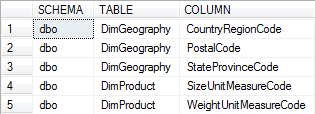
The result of execution will be something like this:

MSSQL - Query Templates

Often working with the database we have to write lot of typical queries.
In this case it is convenient to create templates of such requests.
SQL Server Management Studio (SSMS) gives us that opportunity.

First of all, make sure that you have activated the tab "Templates Explorer":
[Menu] - [View] - [Template Explorer] or <Control>+<Alt>+<T>:


SSMS will show us lot of ready-to-use templates:


For example in the folder "SQL Server Templates" - "Stored Procedure" template "Create Procedure Basic Template". Click on it with double click or click with right mouse button and select from the context menu item "Open". SMS will open a new T-SQL Scripting window with this text:


In this script, there are some expressions in the form of <Name, DataType, DefaultValue>.
You can fill/replace these placeholders with help of corresponding dialog.
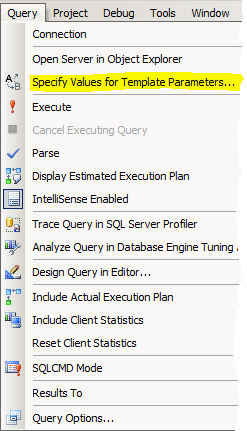
Just call a [Menu]-[Query]-[Specify Values for Template Parameters...]:


or press the button on the toolbar:

In the dialog, you can set new values ​​for the placeholders or leave the default values:


After you click [OK], the placeholders will be replaced with the appropriate values​​:


You can extend templates directory with your custom templates. Just call a context menu for the appropriate folder:


Or copy the folder with your templates (for example @inovex) in this folder:
C:\Users\<Your User>\AppData\Roaming\Microsoft\Microsoft SQL Server\<MSSQL Version>\Tools\Shell\Templates\Sql\


In future articles, I will show examples of some useful templates.